.jpg?width=218&height=98&name=Core42_Primary_Logo_RGB_Grit_Green_and_Impact_Green_Duo-Tone%20(2).jpg)
The Getting Started Guide available in the Quick Links section provides step-by-step guidance for root admins to help configure their workspace.
The root admins can configure their workspace by using Organization SetUp Guide option under the Quick Link menu or from the Dashboard page when you first log in.
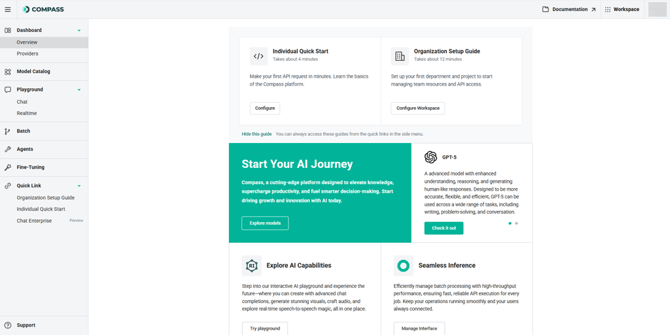
You can click Hide this guide to remove the card from the Dashboard page, but you can always access these from the Quick Link menu.
To perform a quick setup, use the Individual Quick Start option from the Quick Link menu to subscribe to models, assign resources, and generate an API key.
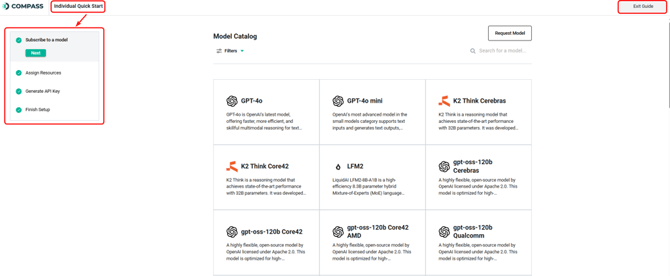
For complete setup, click Organization Setup Guide.
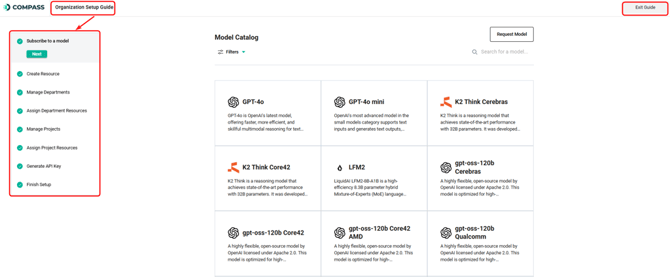
The configuration includes:
- Model Subscription Selection: Choose and activate your organization’s model tier.
- Resource Creation: Set up essential resources needed for your environment.
- Managing Departments: Define departments to match your organizational structure.
- Assigning Department Resources: Assign resources to departments.
- Managing Projects: Create initial projects and assign them appropriately.
- Assigning Project Resources: Assign projects to resources.
- API Key Generation: Easily create and securely store API keys.
You can click Exit Guide anytime to close the setup flow screen and navigate to the Compass Dashboard.